
Wizardo Casino Deposit and Withdraw Options
Manage deposits and withdrawals directly from your Wizardo Wallet. The options available for adding funds and requesting a payout are separated, so you can choose the transaction type first and then select the method supported for your account.
Before confirming a transfer, check the currency, network and applicable limits. This is especially important for crypto, where the asset and blockchain network must match the details used by your external wallet or exchange.
Fund your Wizardo account
 You can add funds using cards, supported bank services, mobile payment options or cryptocurrency. Available payment methods can vary by country and account, so the Wallet always provides the relevant choices for the transaction you are preparing.
Cards, bank services and mobile payments
Visa & MasterCard are available among the card options, while supported bank routes can include Open Banking and selected banking providers. Google Pay and Apple Pay can also be available for players who prefer to use a payment service already configured on their device.
If you use online banking, choose the relevant bank option from the Wallet and follow the instructions provided for that transaction. Processing conditions can depend on the selected provider, so no single timing or limit applies to every bank payment.
Deposit with cryptocurrency
Crypto deposits support several assets and, for some currencies, multiple blockchain networks. Available options include USDT, USDC, BTC, ETH, LTC, SOL, TRX and BNB.
Choosing the correct network is as important as choosing the correct coin. Before sending funds, check that the network selected in Wizardo matches the one used by the wallet or exchange from which you are transferring crypto.
Crypto networks available for deposits
| Asset | Available networks |
|---|---|
| USDT | TRC20, ERC20, BEP20, TON, Optimism, Solana, Polygon, Avalanche C-Chain, Arbitrum |
| USDC | BEP20, Solana, ERC20, Polygon |
| ETH | ERC20, Arbitrum |
| SOL | Solana, BEP20 |
| BTC | Bitcoin |
| LTC | Litecoin |
| TRX | TRON |
| BNB | BEP20 |
Do not send funds until the selected asset and network match on both sides of the transaction. Using an incompatible network can prevent the transfer from reaching the intended wallet.
How to make a Wizardo Casino deposit
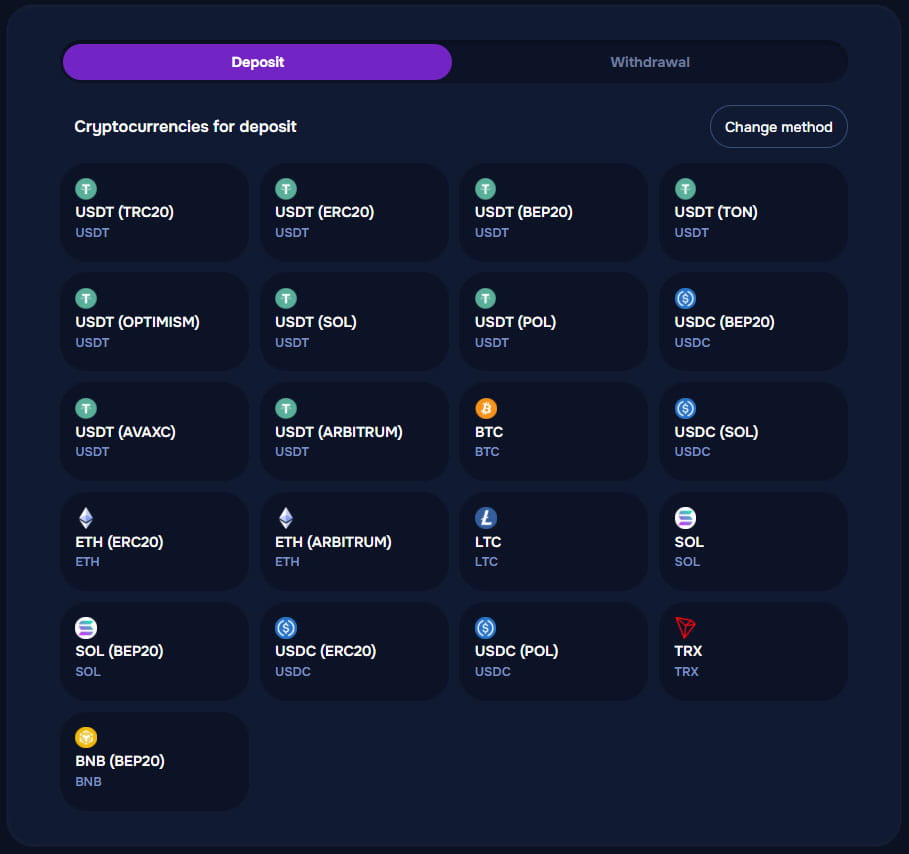 To make a Wizardo casino deposit, open Wallet and select Deposit. Choose the funding option you want to use and follow the details provided for that method.
- Open Wallet and select Deposit.
- Choose a card, bank option, mobile payment service or cryptocurrency.
- If using crypto, select both the asset and the correct network.
- Select a preset value or enter an amount manually where this option is available.
- Choose an eligible promotion or continue without one.
- Add a promotional code if applicable.
- Review the transaction details and confirm.
Depositing funds allows you to use the real-money balance across available casino games. Transaction limits can depend on the selected method, currency and account settings.
Supported account currencies
Wizardo supports EUR, PLN, USD, ZAR and ARS for account funding and play. The exact currency options available to you can depend on your account and the method selected for the transaction.
Add a promotion to your deposit
When an eligible offer is available, you can connect a deposit bonus to the transaction before confirming it. You can also use a promotional code where applicable or continue without activating a promotion.
Promotional conditions are separate from the payment itself. If a bonus is active, check its wagering requirements, validity period and any cashout conditions before using the promotional balance.
Withdraw funds from your Wizardo account
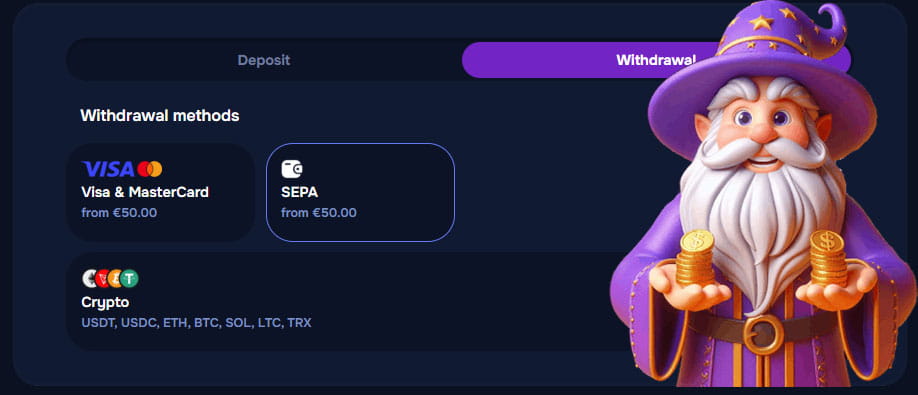 To withdraw money, open Wallet and select Withdrawal. Choose one of the available payout options, specify the requested amount and complete any verification required for your account.
Visa & MasterCard and SEPA are available for withdrawals from €50. Crypto withdrawals support several assets and networks, allowing you to select the combination available for the currency you want to receive.
Withdrawal options and minimums
| Option | Minimum | Details |
|---|---|---|
| Visa & MasterCard | From €50 | Card payout |
| SEPA | From €50 | Bank payout |
| Crypto | Check selected asset | Multiple coins and networks available |
The withdrawal method you choose must be available for your account at the time of the request. Limits and available options can differ between fiat and crypto transactions.
Crypto networks available for withdrawals
| Asset | Available networks |
|---|---|
| USDT | TRC20, ERC20, BEP20, TON, Optimism, Solana, Polygon, Avalanche C-Chain, Arbitrum |
| USDC | BEP20, Solana, ERC20, Polygon |
| ETH | ERC20, Arbitrum |
| SOL | Solana, BEP20 |
| BTC | Bitcoin |
| LTC | Litecoin |
| TRX | TRON |
| BNB | BEP20 |
For crypto payouts, select the asset and network supported by the receiving wallet. The destination details should correspond to the exact network chosen for the withdrawal.
Deposits and withdrawals work differently
The options available for funding an account are not necessarily identical to those offered for payouts. A service available for deposits does not automatically become available for withdrawals, and crypto may also have different conditions depending on the selected asset and blockchain network.
For that reason, use the Deposit section to add funds and the Withdrawal section to request a payout. Each one provides the options currently available for that transaction type.
What to complete before requesting a withdrawal
Before submitting a payout request, make sure your account details are complete and that the financial instrument used belongs to you. We may require additional identity or payment checks before processing a withdrawal.
Third-party payments are not accepted. Depending on the transaction, you may also need to complete the applicable deposit turnover or promotional conditions before the funds become eligible for withdrawal.
Account and payment verification
Verification may include an identity document, proof of address, and confirmation that the card, bank account, or other financial instrument belongs to the registered account holder. We may request further checks when required for the transaction.
Deposit turnover and bonus conditions
Deposit turnover and promotional play conditions are separate. Deposited funds are normally subject to the account's turnover rules before you can request a withdrawal, while bonus-related funds remain subject to the terms of the selected promotion.
If a payment cannot be completed
If a deposit is rejected, try another available option or contact support for assistance. If funds do not reach your balance, provide the relevant transaction details so we can check the payment.
For crypto, confirm the coin, network and destination details before sending funds. If you can't submit a payout, also check whether verification, turnover, or promotional conditions are still incomplete.
Instant deposits are not guaranteed for every transaction, as completion can depend on the selected provider, blockchain network and external payment processing. We also do not publish one average payout time that applies to every withdrawal, since timing can vary by method and verification status.
FAQ
How do I make a Wizardo Casino deposit?
Open Wallet, select Deposit and choose the funding option available for your account. If you use cryptocurrency, select both the required asset and blockchain network before confirming the transfer.
Which cryptocurrencies can I deposit?
You can deposit supported assets including USDT, USDC, BTC, ETH, LTC, SOL, TRX and BNB. Several of these currencies are available through more than one network.
Which networks are available for USDT deposits?
USDT is available through TRC20, ERC20, BEP20, TON, Optimism, Solana, Polygon, Avalanche C-Chain and Arbitrum. Always select the same network in Wizardo and in the external wallet or exchange used to send the funds.
Can I deposit USDC through different networks?
Yes. Available USDC options include BEP20, Solana, ERC20 and Polygon. These networks are separate, so the sender and recipient network must match.
How do I withdraw from Wizardo Casino?
Open Wallet, select Withdrawal and choose an available payout option. Specify the amount, complete any required verification and submit the request.
What is the minimum Wizardo Casino withdrawal?
Visa & MasterCard and SEPA withdrawals start from €50. Crypto limits depend on the selected asset and should be checked before submitting the transaction.
Which cryptocurrencies are available for withdrawal?
Crypto payout options include USDT, USDC, ETH, BTC, SOL, LTC, TRX and BNB. Several assets also support multiple blockchain networks.
Can I use the same crypto network for deposit and withdrawal?
Many of the supported networks are available for both transaction types, but you should still select the network separately for each transfer. Always check the exact asset and network before confirming a payout.
Why can verification be required before withdrawal?
Verification confirms the identity of the account holder and can also confirm ownership of the financial instrument used for the transaction. Depending on the request, additional documents may be required before processing can continue.
What should I do if my deposit does not go through?
Try another available funding option or contact support if the transaction cannot be completed. For crypto transfers, also verify the selected asset and network before attempting another payment.