Wizardo Casino Registration and Account Verification
Wizardo Casino registration gives you access to your player account, wallet, bonuses, account settings and real-money games. To create an account, you must be at least 18 years old, provide valid personal details and accept the Terms & Conditions and Privacy Policy.







The process is divided into clear stages: first you create the account, then complete your personal profile, verify your identity when required and manage security settings from the Profile section. This approach keeps online casino registration separate from later verification and account management.
Create your Wizardo account
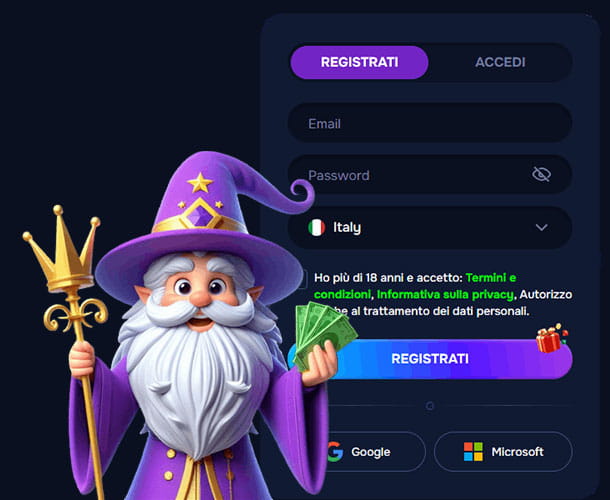 The first registration step requires only the information needed to open your account: email address, password and country. You must also confirm that you are over 18 and accept the applicable terms and privacy rules before completing registration.
Register with email
To sign up, enter an email address you can access, create a password and confirm your country. Complete the required age and policy confirmations, then select “Register”.
- Open the Wizardo registration form.
- Enter your email address.
- Create a password.
- Confirm your country.
- Confirm that you are 18+ and accept the required policies.
- Select “Register” to create the account.
Use a valid email address from the start. It is used for account communication, password recovery and verification-related actions.
Register with Google or Microsoft
Google and Microsoft are also available as alternative registration methods. They simplify the first step, while any additional personal data required for your account can be completed later in the Profile section.
Regardless of the method you choose, the account must belong to you and all personal information must be accurate.
Set up your account after registration
After creating the account, use the Profile area to complete your personal information and manage the settings connected to your account. The main sections include personal details, Verification, Security and Restrictions.
Add and maintain your personal information
Your profile includes the main personal and contact details used for account management:
| Information | Details |
|---|---|
| Identity | First name, last name, date of birth and gender |
| Address | Country, city, postal code and full address |
| Contact | Phone number and email address |
Enter your information exactly as it appears in your official documents. Keeping profile data accurate helps avoid mismatches during verification and payment checks.
Verify your identity from the Profile area
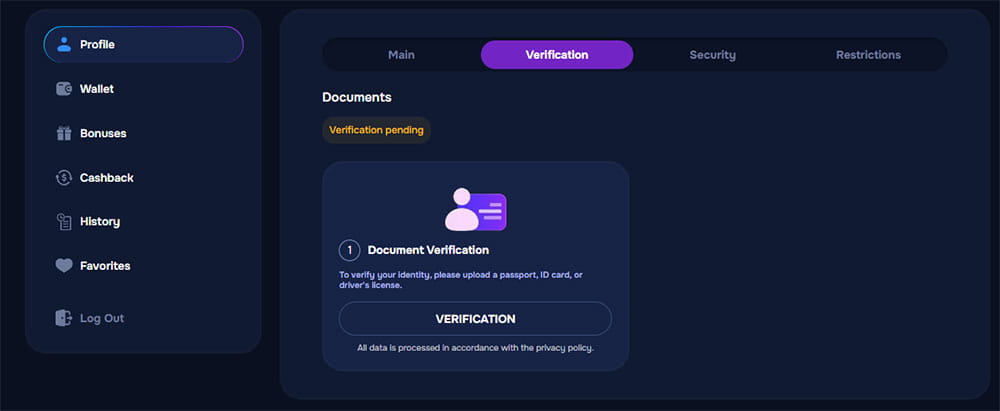 Identity verification is managed from the Verification section of your profile. When verification is required, you can upload an accepted identity document and follow the account instructions provided for the check.
Documents for identity verification
You can use one of the supported identity documents, including:
- Passport
- Identity card
- Driving licence
The document must belong to the registered account holder. Depending on the type of check, additional documents such as proof of address or confirmation of payment-method ownership may also be requested.
Verification status
The Verification section lets you follow the current status of your document check. If verification is still pending, wait until the review is completed or provide any additional information requested for your account.
No fixed approval time applies to every verification case, as additional checks may be required depending on the account and documents provided.
Protect access to your Wizardo account
Account security can be managed from the Security section of your profile. Here you can update your password whenever you want to replace your existing credentials.
Change your password
To change the password, enter your current password first, then create and repeat the new one before saving the update. The new password must include an uppercase Latin letter, a lowercase Latin letter, numbers and special characters.
- Open Profile and go to Security.
- Enter your current password.
- Create a new password.
- Repeat the new password.
- Select “Save”.
Keep your login details private
Do not share your password or other account credentials with another person. Two-factor authentication is also available as an additional protection against unauthorized access.
Recover access if you forget your password
Password recovery is separate from changing a password while you are already logged in. If your casino login is unavailable because you have forgotten the password, request a reset using the email linked to your account.
The reset instructions are sent by email. Check the Spam folder if the message does not arrive in your inbox, and contact technical support if you still cannot restore access.
What becomes available after registration?
Once you log into Wizardo, the account menu gives you access to the main sections used to manage your activity:
- Profile — personal details, verification, security and restrictions.
- Wallet — deposits and withdrawals.
- Bonus — promotional balances and available rewards.
- Cashback — cashback information linked to your account.
- History — previous account activity.
- Favorites — games saved for quicker access.
The same account also works on the mobile website and through the casino app PWA format, without creating a second profile.
Account controls and restrictions
The Restrictions section includes options for account closure and Self-Exclusion. These controls are available when you want to stop using the account or block access to gambling services.
Closing the account ends access to the services connected to that profile. Self-Exclusion blocks access to gambling activity according to the restrictions applied to the account.
Registration checklist before you continue
Before completing registration, make sure that your account information is correct and belongs to you. This makes later verification and account management more straightforward.
- You must be at least 18 years old or meet the higher legal age applicable in your jurisdiction.
- Use your own valid email address.
- Provide accurate personal information.
- Create and use only one account.
- Use payment methods registered in your own name.
- Make sure the service is permitted where you live.
A casino bonus on registration, when available for your account, is activated separately from the account-creation process and comes with its own terms and wagering requirements.
FAQ
How do I create a Wizardo Casino account?
Enter your email address, create a password, confirm your country and complete the required age and policy confirmations. You can then select “Register” or use Google or Microsoft as an alternative registration method.
What details are required during the first registration step?
The initial form asks for your email, password, country and the required legal confirmations. Personal details such as name, date of birth, address and phone number can be completed afterward in your profile.
Can I register with Google or Microsoft?
Yes. Both options are available as alternative registration methods, while additional profile and verification information may still be required later.
How do I verify my Wizardo account?
Open Profile and go to Verification, then upload one of the accepted identity documents. Additional documents may be requested if further KYC checks are required.
Which documents can I use for identity verification?
You can use a passport, identity card or driving licence for the identity-document step. Proof of address or payment-method ownership may also be requested depending on the verification required.
How do I change my password?
Go to Profile and open Security, enter your current password and then create and repeat the new password. Save the change once the new password meets the required format.
What is the difference between changing and resetting a password?
Changing a password is done from Security while you already have access to the account. Resetting a password is used when you cannot access the account and requires the email linked to your profile.
What should I do if the password reset email does not arrive?
Check your Spam folder first, as automated messages can sometimes be filtered there. If you still receive nothing, contact technical support for assistance.
Can I register more than one account?
No. You can create and use only one Wizardo account, and duplicate accounts may be restricted under the Terms & Conditions.
Can I close or restrict my account?
Yes. Account closure and Self-Exclusion controls are available in the Restrictions section of your profile, allowing you to stop access to the account or gambling services.